Recently, the design software landscape has undergone significant changes with the advent of various cloud-based tools and AI technology. Many new platforms offer more collaborative and flexible workflows, particularly for digital design needs. However, amid these developments, some professional software programs maintain their role in the creative industry.
One of the software programs that maintain their role is CorelDRAW Graphics Suite. This design software has a long history with designers in various fields, especially those related to visual production and printed media. Despite not always being in the spotlight, creative industry players still demand this software due to its stable workflow.
This article will talk about the role of CorelDRAW Graphics Suite in modern design while seeing its relevancy amidst various graphic design software in 2026.
Table of Contents

CorelDRAW is a design software package from Corel Corporation, which is now under the auspices of Alludo. Unlike a single design application, this suite consists of several integrated tools to support various design needs, from vector illustration to image processing.
Here are the main components in the CorelDRAW application:
This approach allows designers to work within one ecosystem without switching to other design software. This will be an advantage, especially for projects that include illustration combination, layout, and image processing.
As a design suite, CorelDRAW Graphics Suite supports more technical and structured design needs, especially in a visual production context. This is what keeps it relevant in various professional workflows to this day.
As a design package that has evolved over the years, CorelDRAW offers various features for professional design needs, particularly in the context of production and printed output. These features focus not only on visual creativity but also on workflow efficiency and technical accuracy.
Here are some of the main strengths of CorelDRAW Graphics Suite:
CorelDRAW offers stable and precise vector tools for professional designers. These tools include node editing, shape manipulation, and various drawing features that allow the making of detailed graphics with accurate control.
This software program offers the arrangement of multi-page documents. Therefore, it is suitable for design needs such as catalogs, brochures, or other printed material that uses a complex layout structure.
One of the advantages of CorelDraw Graphic Suite is its support for CMYK-based color workflows. This allows designers to maintain color consistency in the print production process.
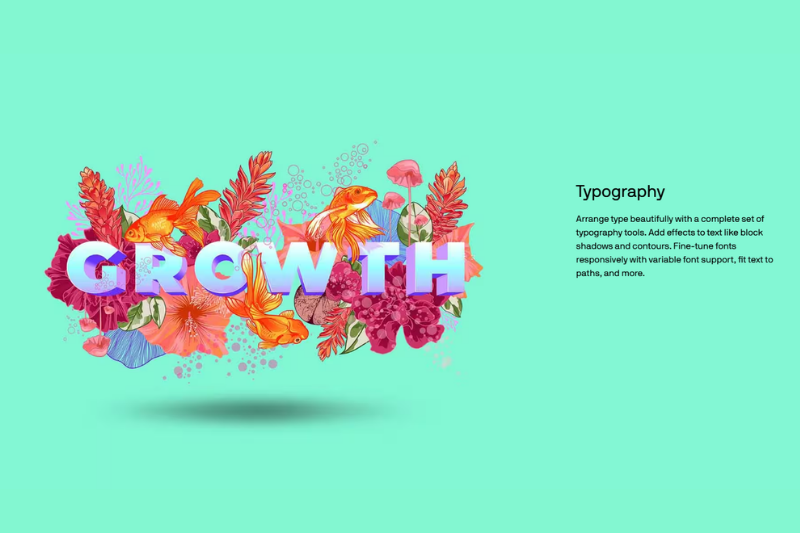
With the support of Corel Font Manager, users can arrange the font more efficiently. The available typographic controls are also quite comprehensive for text-based design needs.
Besides its desktop version, there is also CorelDraw.app, which allows users to flexibly access the file through their browser. This version provides convenience in a more dynamic workflow.
Overall, these key strengths give designers an advantage while utilizing CorelDRAW. With its feature set, this program serves not only as a design tool but also as a work system that supports the entire visual production process.

Despite the emergence of many new design software programs, CorelDraw Graphic Suite remains widely used. For example, in several industrial sectors that require technical accuracy and consistent production output. In this context, the software’s strength lies not only in its features but also in its ability to support production-based workflows.
Professional designers that work in creating printed materials often use CorelDraw to make brochures, posters, and catalogues.
In the signage industry, CorelDraw plays a role in signage manufacturing, vinyl cutting, and large-format graphic design.
In the fashion industry, CorelDraw is widely used to design screen printing, embroidery, and various textile-based products.
In promotional merchandise, designers often use it to create designs for various products, such as mugs, tote bags, and branding souvenirs.
CorelDraw is often used to create dieline-based layouts that are ready for production.
In the print industry, file flexibility, vector precision, and color control are key factors. CorelDraw Graphics Suite satisfies these needs well, remaining a practical choice for many production professionals.
Despite its strengths in production workflow, CorelDraw Graphics Suite still has some limitations when compared to other design software that is more modern or more focused on digital needs.
One noticeable difference is the smaller ecosystem compared to Adobe Creative Cloud. CorelDraw’s limited support for plugins, cross-application integration, and external resources often results in reduced flexibility in certain workflows.
Some of the limitations to consider when using CorelDRAW:
However, this limitation doesn’t make the software any less competent; rather, it demonstrates the advantages of CorelDraw Graphics Suite in certain contexts, particularly for print-based design. Hence, for more collaborative and dynamic digital design needs, designers often combine it with other tools.
In today’s design ecosystem, no single software tool can meet all creative needs. Modern designers typically use multiple tools simultaneously, depending on the type of project and the stage of work. In this context, CorelDraw Graphic Suite occupies a specific position compared to other design software.
As previously said, each software application has its unique capability for fulfilling design requirements. CorelDraw Graphics Suite is not a replacement for other tools but rather an addition to the overall ecosystem. The primary goal is to provide accurate and consistent design outputs.
To better understand how these tools differ, see our guide to the best graphic design software widely used by modern designers today.
In the ever-evolving design landscape, CorelDraw Graphics Suite maintains a clear position, particularly in workflows focused on print production. While many newer software programs offer a more modern and collaborative approach, the need for technical precision and file stability still makes this software relevant across a wide range of professional contexts.
For modern designers, this software perhaps isn’t the only option for all projects. However, CorelDRAW Graphics Suite maintains its role as an important part of complex designs’ workflow. Especially when preparing a design for the production stage, accurate and consistent results are crucial.